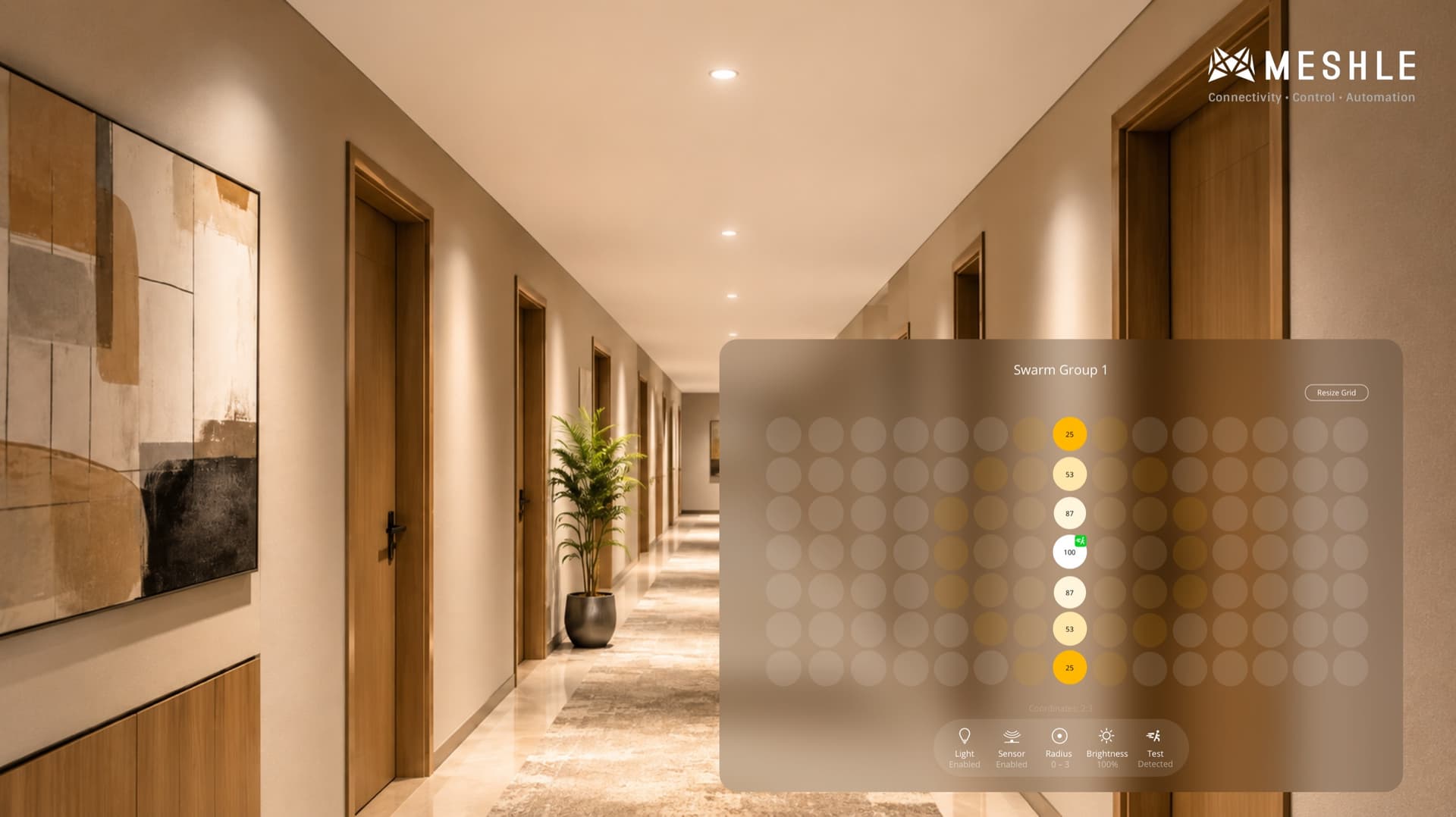
Corridor Function Lighting: From Classic Corridor Mode to MESHLE Swarm
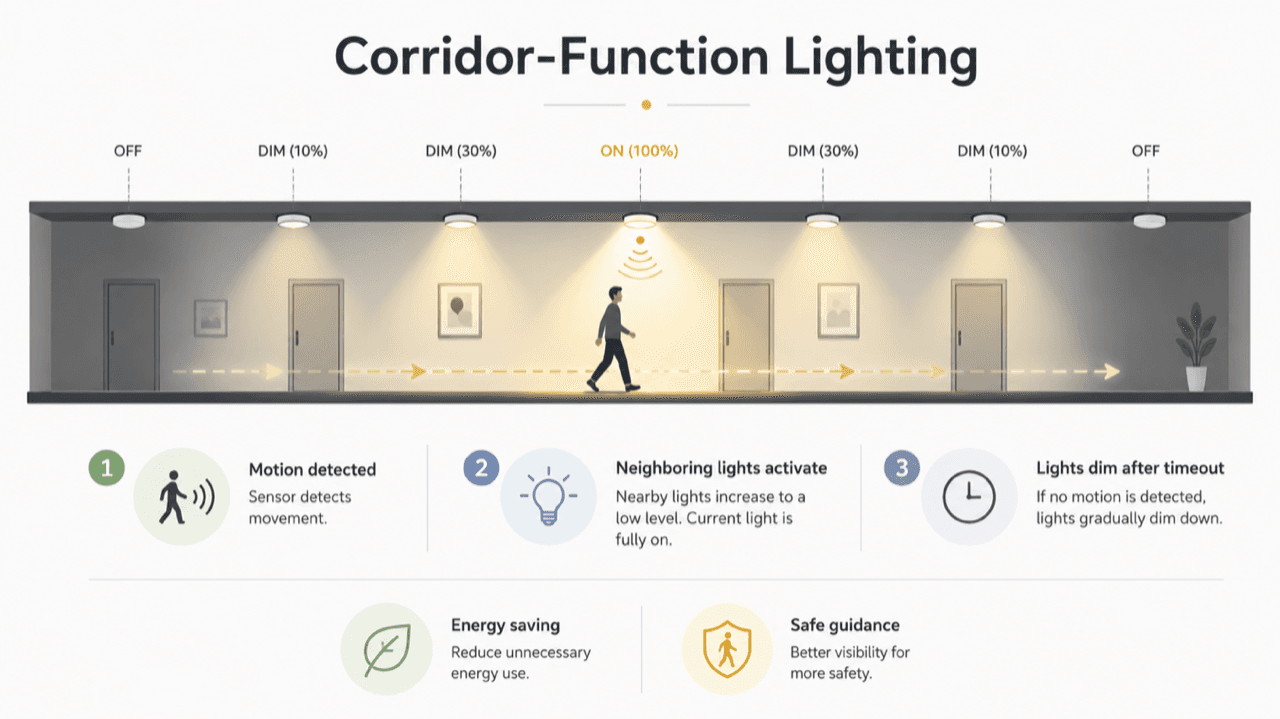
If you spec lighting controls, you already know corridor function. It is the classic behaviour where a path lights up ahead of a person and dims behind them: motion at one point steps up the nearest luminaires, neighbours hand off, and the corridor stays lit only where someone actually is. It saves energy without leaving anyone walking into the dark.
The feature is well understood. The way it is usually built is the problem. Classic corridor function is put together one of two ways: wired DALI lines tied to a central controller, or a wireless system stitched together from groups, scenes, and rules set by hand. Both work — but both are slow to commission and rigid to change, and the wireless route is notoriously fiddly to get right and to troubleshoot when a single group or rule is misconfigured. MESHLE Swarm delivers the same presence-following behaviour without that scaffolding: no central controller, no gateway, and no maze of groups, scenes, and rules. Every node decides for itself, and commissioning is the same handful of steps whether you have five luminaires or five hundred. To override the presence-driven light with a single press, pair a battery-free Bluetooth switch — no wiring at all.
What corridor function actually means
Corridor function is a sequential, presence-driven lighting behaviour. As someone moves along a path, luminaires step up to full output just ahead of them and dim back down once they pass. Each fitting hands off to its neighbour so the lit zone travels with the person rather than switching the whole run on at once.
The intent is simple: full light where it is needed, a soft gradient at the edges, and everything else held at a low idle level or off. Done well, nobody notices the controls at all — they just never face a dark stretch. That experience is exactly what MESHLE Swarm reproduces, with the closest lights at the target brightness, further ones dimming down in a gradient, and the rest at idle.
Where classic corridor function falls short
The behaviour is fine. The architecture behind it is where projects get expensive.
Built by hand, either way. Whether it runs on a wired controller or a wireless system, classic corridor function has to be configured up front — the zones, the step sequence, and the hand-off logic are all set manually. A wired controller also adds a single point of failure: if it is offline, mis-addressed, or overloaded, the whole run falls apart.
Slow to set up, harder to fix. The wireless route avoids a central controller, but it trades the wiring for a scaffold of groups, scenes, and rules. Building that scaffold is laborious, and resolving a misconfiguration is worse — one wrong group or rule quietly breaks the hand-off, and finding it costs hours.
Rigid to change. Move a wall, repurpose a space, or add fittings, and the addressing or the rules have to be re-mapped. Where the design is wired, pulling control cabling back to a central node through an occupied building is slow and disruptive — often the single biggest reason corridor function never gets specified for an existing corridor at all.
Swarm: corridor function without the controller
MESHLE Swarm delivers corridor behaviour without a central brain. Each luminaire is self-aware of its surroundings: using sensors, the network knows where people are moving and lights the right areas automatically — always a step ahead of the movement.
It runs on MESHLE’s proprietary Bluetooth Mesh, so presence propagates node-to-node across the network. There is no controller to depend on and no gateway or internet required — Swarm is offline-first and keeps running locally on its own. Every node is aware of its neighbourhood’s state, not just its own paired sensor, so when one sensor goes idle while another nearby is still active, the light recalculates instead of dropping out.
That neighbourhood awareness also hides the classic late-trigger problem. Once the first sensor in a path fires, every sensor after it finds the light already ahead of the user, so a late trigger is never visible to the person walking through.
Start with one dimension: a single row of luminaires along a corridor. Tap a sensor to trigger presence, then drag the sliders to see how the Inner and Outer Radius shape the bright zone and its falloff.
One dimension: drag the sliders to widen or narrow the gradient along the corridor. Click a sensor to toggle it off and on.
How a lighting designer sets it up
Commissioning happens in the MESHLE App, in a grid — no floor plan required.
- Create one group of devices. The Swarm button appears in the bottom menu once the group exists.
- Open Grid view and resize the canvas to set rows and columns. Lay the placeholders out to match reality — a row for a straight pathway, a grid for a warehouse, and an L-shape for a corridor with a turn.
- Assign each placeholder a role: Light, Sensor, or Both.
- Tune the radii per sensor. The Inner Radius sets the guaranteed-brightness zone; lights between Inner and Outer Radius calculate their own output by distance, fading to idle beyond it. Each sensor can carry its own values.
- Link placeholders to physical devices. Tap a device and the matching real luminaire blinks, so you assign it to the right spot on the grid.
- Save, then use the Live Preview tab: click any sensor to simulate presence and watch the grid — and the real paired hardware — respond, so you fine-tune in place without running the corridor to trip sensors by hand.
Sensor settings can be copied to all sensors in one tap, so an L-shaped corridor is configured once and applied across the run.
Beyond a single corridor
The same model scales past one hallway. The single dimension of the corridor becomes an area: instead of a row, the sensor now sits in a grid, and the brightness gradient spreads in every direction — the logic is identical, just two-dimensional.
Two dimensions: the same gradient, now across an area. Drag the sliders and click the sensor to toggle it.
Zoning without spillover. Assign separate physical areas to their own Swarm groups so presence in one does not bleed through walls into another. Two offices separated by a corridor each get their own group, so neither lights up because of activity in the other.
Stairwell standby compliance. In many countries, standby lighting in stairwells is required by regulation for security and evacuation. Swarm satisfies that requirement while holding standby energy to a minimum — the stairwell stays at a low baseline and steps up only where someone actually is.
Daylight harvesting and regulation. Pair a light sensor into the group and use lux values to enable Swarm only below a darkness threshold, or to regulate brightness directly for daylight harvesting. Settings can mix inside one group: some lights regulate against daylight, others simply switch on presence.
HCL on top of Swarm. Tunable-white luminaires can run Human Centric Lighting on top of Swarm — Swarm decides how bright, HCL decides the colour temperature — so circadian comfort and presence control coexist on the same fixtures.
For OEMs and specifiers
Swarm is not tied to a single product line. Its output drives existing lighting hardware through BLE-to-DALI, 0-10V, DMX, and SPI controllers, so you can bring presence-following behaviour to fixtures and drivers you already build or specify. It also runs across every MESHLE-enabled product — drivers, controllers, switch actuators, dimmers — and every MESHLE lighting type, from dimmers to CCT, RGB, RGBW, and RGBTW.
Sensors can be internal to a luminaire, mounted separately on a fixture, or installed as standalone ceiling and wall units, and select third-party sensors are supported via MESHLE firmware on a per-model basis.
The commissioning story is the real selling point: it is the same workflow whether you are handling 5 nodes or 500. There are no scenes and groups to multiply, no central controller to size, and no internet dependency to design around — which makes Swarm a clean default to bake into a product line rather than a bespoke control package per project. For a wider look at the model behind corridor function, see our guide to swarm lighting.
Frequently asked questions
Is corridor function the same as MESHLE Swarm?
They produce the same experience — light that follows a person down a path — but they are built differently. Classic corridor function is built either on a central controller or on a wireless system assembled from groups, scenes, and rules, all configured by hand. MESHLE Swarm propagates presence node-to-node — no central controller and no manual scene-and-rule setup — so it is offline-first and far easier to commission and change.
Does Swarm need a gateway or internet connection?
No. Swarm runs locally on MESHLE's proprietary Bluetooth Mesh and is offline-first — it keeps working with no gateway and no internet. A gateway is only needed if you want to bridge the network to a BMS or cloud for other reasons.
Can I retrofit existing luminaires?
Yes. Swarm output drives existing lighting hardware through BLE-to-DALI, 0-10V, DMX, and SPI controllers, and works with sensors that are internal, fixture-mounted, or standalone. That avoids pulling control wiring back to a central node, which is the usual blocker for adding corridor function to existing buildings.
What hardware does Swarm drive?
Every MESHLE-enabled product — drivers, controllers, switch actuators, dimmers — across dimmer, CCT, RGB, RGBW, and RGBTW lighting, plus third-party fixtures via BLE-to-DALI, 0-10V, DMX, and SPI controllers. Tunable-white fixtures can also run HCL on top of Swarm.
Bring Swarm to your corridors — and your product line
Whether you are specifying controls for a project or building Swarm into the fixtures you ship, MESHLE makes presence-following light easy to adopt and easy to scale.